User Management
How to Manage Your Users
The Hellenic B2B Platform helps our clients easily handle their users. When users sign up through our partner, the first user automatically gets all permissions. But our system also lets clients adjust permissions for each user separately, giving them control over who can do what
Permissions
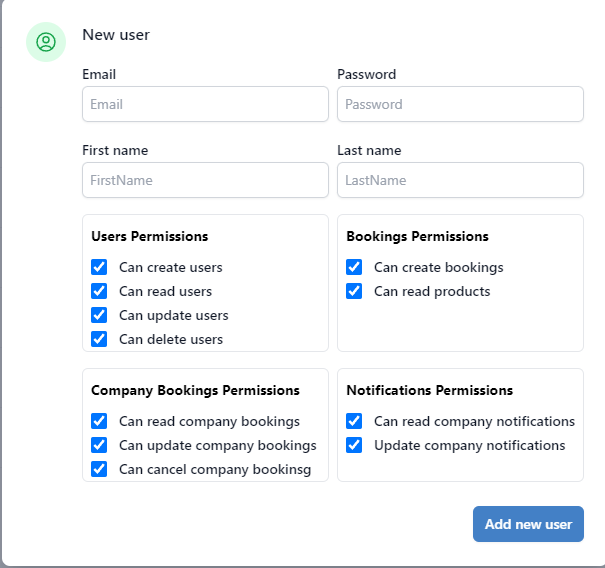
- Can Create Users: Users granted this permission are able to create new user accounts within the office environment.
- Can Read Users: Users with this permission can view the list of registered users associated with their office.
- Can Update Users: Users with this permission can modify user information, such as name and permissions. This option is unavailable if 'Can Read Users' is disabled.
- Can Delete Users: Users with this permission can remove existing user accounts.
- Can Create Bookings: Users with this permission can freely make bookings on our platform without restrictions. If disabled, the user can only explore.
- Can Read Company Bookings: Users with this permission can view company bookings and access all associated information, such as notes, booking summaries, and flights. If disabled, they can only manage their own bookings
- Can Update Company Bookings: Users with this permission can modify company bookings and access all associated information, such as notes, booking summaries, and flights.If disabled user can't modify any of company bookings not even their own
- Can Cancel Company Bookings: Users with this permission can cancel bookings. If disabled can't cancel any company bookings not even their own.
- Can Read Company Notifications Users with this permission can read all company notifications. If disabled, users can only view notifications related to the bookings they've made.
- Can Update Company Notifications Users with this permission can mark all company notifications as seen. If disabled, they cannot mark any company notification as read.